Building PuttPulse, one decision at a time
Building a putting app with AI agents, learning Flutter along the way, and working out what it takes to get the result into players’ hands.
By Matthew Oldach · Project record through October 28, 2026
I started PuttPulse because I wanted to get better at putting. It was May 2026, my second serious year of disc golf, and I was considering joining a men’s league. I also had a tournament in mind for 2027. App development began in June, with two connected questions: could I build something that helped me choose the right drills, distances and practice schedule—and would following that practice actually improve my game?
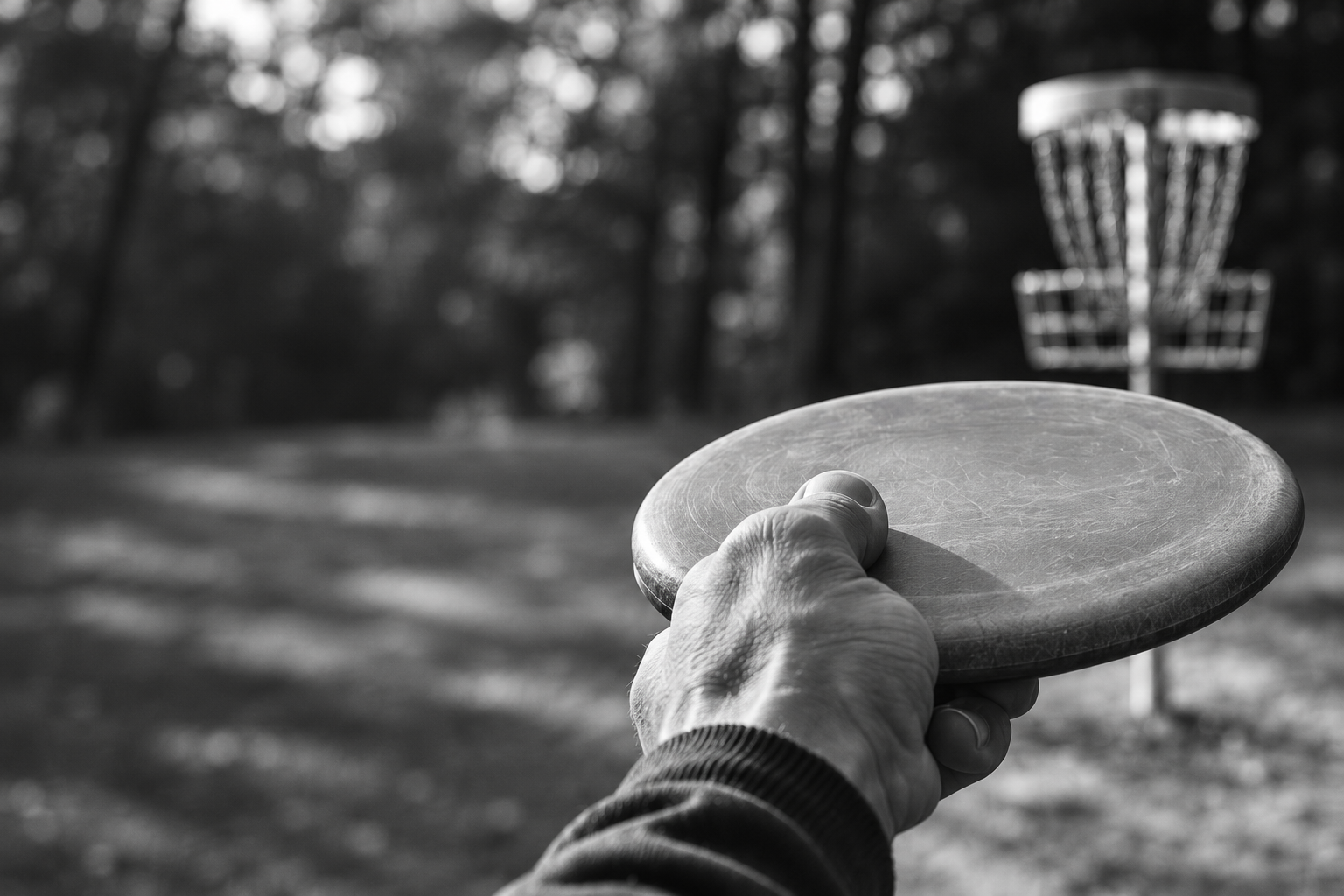
I come from ball golf, where “drive for show, putt for dough” is familiar advice. Putting matters in disc golf too. UDisc was useful for recording rounds, but I wanted more help with the practice between them. I wanted to record my putts, understand how consistent I was, and have something useful to take back to the basket.
I knew I wanted an app for Android and iOS. I didn’t know which language or framework to use. AI helped steer me toward Flutter, a framework for building both from one codebase, and drove much of the coding in Dart, a language I hadn’t used before. I brought a background in data science, programming and visualization; mobile development was the unfamiliar part.
That was a change from an earlier R Shiny project of mine, an Instagram-like application built with R and Python. I knew those languages and how to make them work together, but the application was slow. With AI, I could choose tools suited to a mobile app without already knowing their syntax and ecosystem inside out. I still needed to understand the decisions and examine the results, but unfamiliarity with the language no longer decided what I could build.
The project became a story in two parts. First, I had to learn how to direct agents working in a framework I hadn’t used before. Then came the work of getting the app into players’ hands: translation, privacy, a business model, testers, and distribution. That second part is still underway.
The practice experience I wanted to build
01 / Early implementation · July 19, 2026
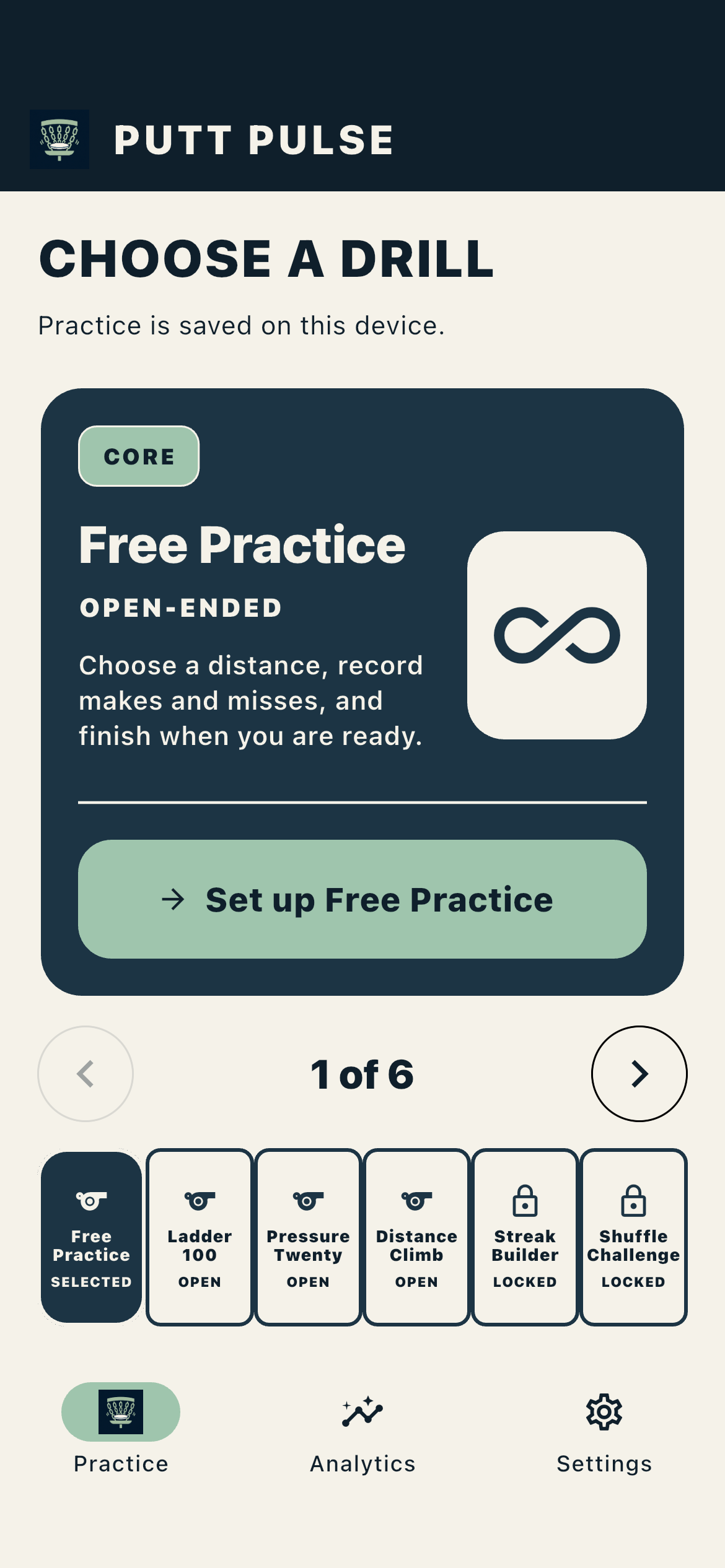
A working starting point: select a drill and begin practice.
02 / Latest development · November 4, 2026
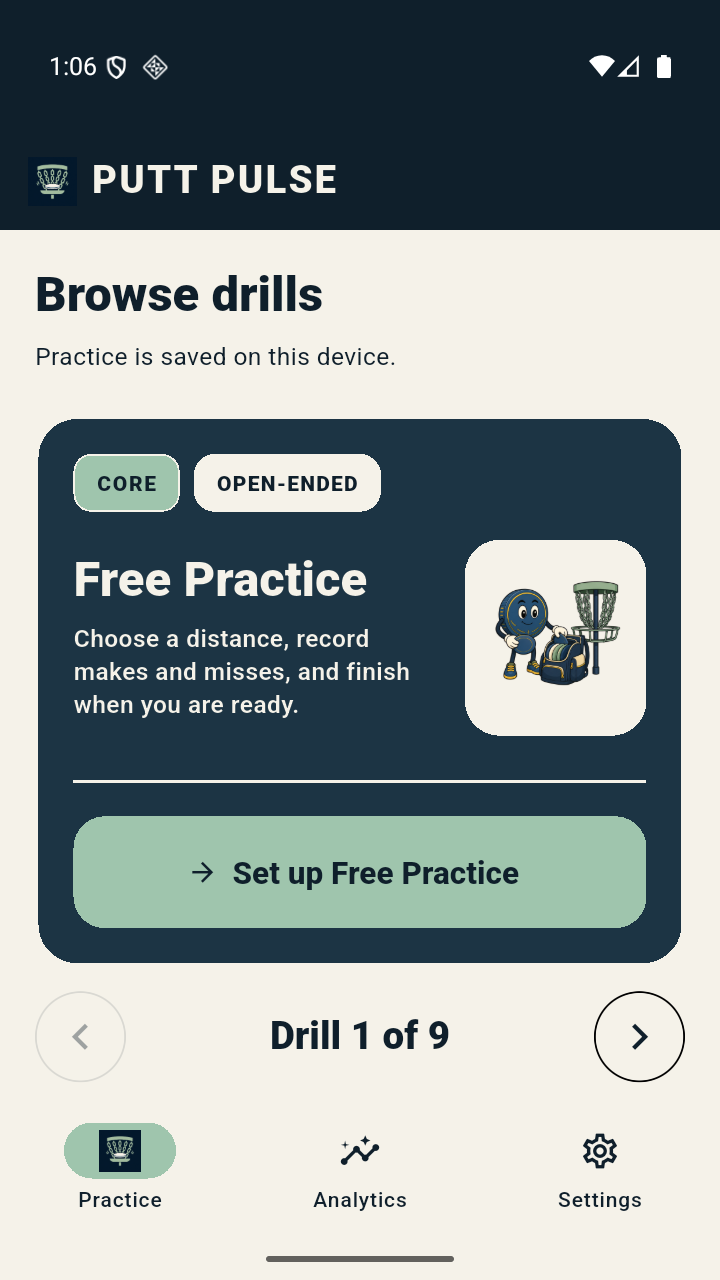
A focused drill card: instructions, artwork and a clear next action.
From an early version in July to the app I’m building today. Click either image for a closer look.

Illustrative imagery.
On this page
1. Start with the practice I wanted
I’d looked at other practice apps and kept wanting clearer design, drill names I could understand, and more to try before reaching a paywall. DGputt was one good app I found, but some drill names were unfamiliar to me, and I couldn’t tell what some of the paid drills involved before unlocking them. That made clear descriptions and useful free practice important to me when designing PuttPulse.
Putting tutorials also got me thinking about how to structure practice. Start at a manageable distance, repeat the putts, look at the consistency, and gradually increase the challenge. I wanted the app to connect what I’d just recorded to a useful next session, with some variety beyond doing Free Practice again.
The early product brief made that more concrete. A player should be able to enter putts quickly outdoors, see a meaningful pattern, and understand what to practise next. Progress should be visible. Each chart, drill, and reminder needed a reason to be there.
Free Practice is the open-ended option: choose a distance, record makes and misses, change distance when you want, and finish when you are ready. It gives a familiar basket session a record without imposing a game or a score to beat. Structured drills add a specific challenge: a target over a fixed number of putts, a distance to earn, a streak to hold, or a different angle around the basket.
I wanted a broader choice than I’d found in my own search. The library has nine enabled drills, with four in the free tier and five in Premium:
| Drill | What the player does | Access |
|---|---|---|
| Free Practice | Record putts at chosen distances, with no fixed finish or winning condition. | Free |
| Ladder 100 | Complete 100 putts; each full batch moves the distance up or down according to its results. | Free |
| Pressure Twenty | Choose a distance and make target, then try to reach it over 20 putts. | Free |
| Distance Climb | Make at least three of five to earn the next distance; the first failed set ends the climb. | Free |
| Consecutive Makes Ladder | Make a chosen number in a row before moving farther away. | Premium |
| Around the Clock | Work around eight positions at the same distance from the basket. | Premium |
| Rungshift | Move nearer or farther according to each batch’s results, earning more points at harder distances. | Premium |
| C1 Gauntlet | Work through six distances within 10 metres of the basket, with weighted scoring. | Premium |
| Clutch Nine | Play nine three-putt “holes,” with results scored relative to par. | Premium |
The variety gives me different ways to make a session purposeful and repeatable. A distance ladder asks a different question from a fixed-distance target or a streak. Whether those exercises lead to better putting on the course is the larger question I want to test with players and coaches.
2. Give AI agents context and boundaries
The agents needed to know what I meant by a putting app. What counts as a completed session? What should Undo do? Which decisions were already settled? I also needed to understand enough of their work to review it, even while learning the framework.
We made that context part of the repository. Its instructions point to the product vocabulary, workflow graphs, reusable skills, and the limits on each role. A routing step chooses the smallest workflow that fits the request, then loads more detail when the task needs it.
I chose a clearer division of work between two AI models: Sol would do the day-to-day investigation and implementation, with Astra available for a focused second opinion. We adopted this approach in September. Sol remains responsible for resolving the task. Astra can examine a specific difficult decision or independently review a change, but cannot edit it. I still decide the product direction and approve consequential steps.
Text version
Swimlane showing the product owner setting scope and approvals, Sol investigating and implementing, and Astra optionally reviewing bounded evidence before Sol resolves findings.
For a chart change, a saved set of instructions can tell an agent which data rules to preserve, which examples to consult, and how to check the result. These reusable instructions are called skills. We used them for analytics design, planning, evidence checks and review before combining code changes. Most were tailored to PuttPulse. The public anti-ui-slop skill supplied additional interface-design guidance.
A short handoff matters too: which source revision was used, what changed, what was checked, and what still needs attention. I keep private field notes for the longer project story, separating recollection from results backed by an artifact.
OpenAI’s Dots feature in practice: a sprint that knew when to stop
I use OpenAI’s Dots feature to coordinate PuttPulse work across project chats. In one quality sprint, an analytics specialist corrected a chart that could join results across weeks with no practice, making separated observations look continuous. The fix kept those gaps visible. The coordinator combined it with a reviewed training-screen fix in a separate copy of the code, where the affected automated checks passed. Testing the combined result on an emulator or phone was still blocked by problems with the device tools.
PuttPulse moves forward.
I work on other projects.
I can move another project forward while agents carry out agreed PuttPulse work. I return when a decision needs my judgment.
OpenAI’s Dots feature
PuttPulse work
- Scope agreed
- Implement
- Test and review
- Checkpoint
- Next eligible work
Me / Other projects

Focused work elsewhere
Autonomy within agreed boundaries. Blocked work is recorded; release approval remains mine. Photograph: editorial illustration.
That was a useful stopping point for those changes: retain the checked version until the device tools worked, and leave unresolved product questions open. What should advertising do when a training plan is unavailable? What should “Improving” mean in coaching terms? Those needed my product judgment or a coach’s expertise. I’m still busy and switching context, but I can move another project forward while agreed PuttPulse work continues.
3. Turn conversations into reviewable work
A decision is easier to use later if the next agent can find it without reconstructing an entire conversation. We defined a Practice Session as the record of one practice, an Attempt as one putt, and a Drill Snapshot as the drill rules saved with that session. Written behavior rules, with their revision history, gave agents something explicit to implement and reviewers something to check.
GitHub Issues became the documented home for issues and product requirements, with five workflow labels covering incoming requests, missing information, agent-ready work, human work, and rejected requests. Pull requests handled code review and delivery.
The local task records carry more detail. The October training work lists dependencies, evidence, and the next eligible action. That makes a useful difference when picking something up again: an interview kit can be ready while the interviews haven’t happened, and a coach review can still be blocked after all its forms are prepared.
How I delegate
an analytics change.
I set the goal. The agent proposes a plan, makes the change, and brings back checks. I review whether the result helps the player.
- Owner / example prompt
My request
“Redesign the Putting analytics so players can see individual sessions, compare results across distances, and understand their consistency. Keep the underlying data unchanged, explain the chart choices, and check accessibility.”
- Agent / scope summary
Agree the scope
Refine the Putting prototype. Keep the same underlying facts.
- Artifact / recorded change
What changed
Selectable session dots, a box summary and shared distance scales.
- Verification / recorded checks
Check the result
107 scoped tests and browser interaction checks.
- Owner / open review question
Review the usefulness
Does this help a player choose what to practise?
Based on a real task; prompt rewritten here to make the brief clearer.
Worktrees are isolated copies of the code for separate changes. They let an agent work on analytics without disturbing another effort, but each copy still needed an owner, a review, and a decision about when to combine it with the main app.
Prompt case 1 — make the implementation contract explicit
Authentic retained prompt excerpt:
“Before starting a slice, identify its source specification and the one named test that will prove it.”
Context, verification and human review
The implementation prompt asks for small changes with a clear check: write a test that exposes the missing behavior, make the change, then tidy the code and check the affected parts. It also tells the agent which source to follow and to stop inventing behavior when specifications disagree.
That makes the drill rules, saved records and tests available for separate review. It’s a method the prompt asks for, not proof that every task followed it perfectly. Scope and acceptance still come back to me.
4. Make the practice record worth trusting
If I’m using practice results to decide what to do next, I need to trust what they represent. An accidental tap should be correctable. An interrupted session should be recoverable. Updating a drill should not quietly change the meaning of last month’s practice. Those became requirements I could give the agents and check against concrete examples.
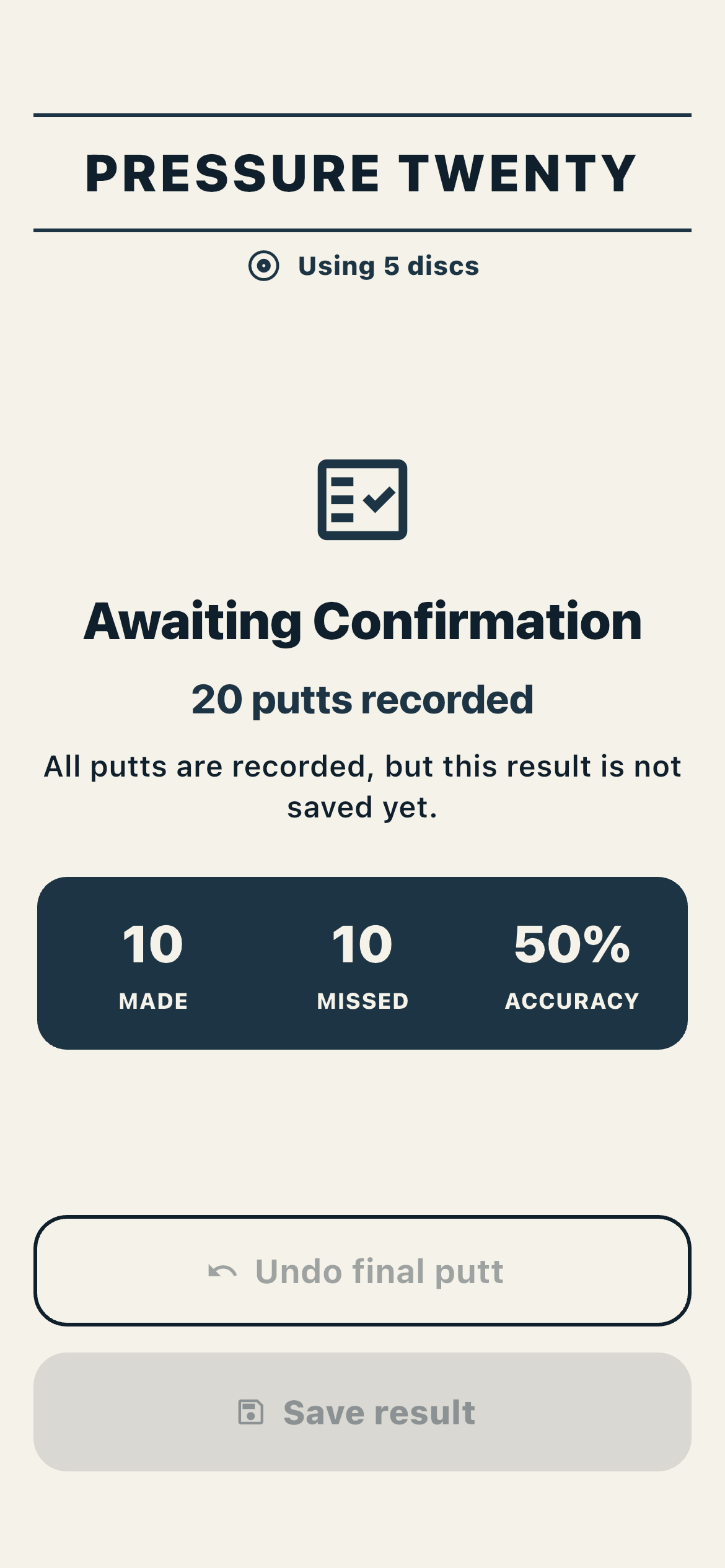
The app keeps each putt in order and saves the drill rules used for that session—its Drill Snapshot. That gives Undo and recovery the same record to work from, and preserves the context behind an old result. A saved session also needs an explicit ending: I can review the last putt before accepting the result into my practice history.
The last putt
isn’t the end.
A session needs a deliberate ending. The last input should still be correctable before the result becomes part of completed history.
Historical app · July 19, 2026
Open full screenshot ↗
One deliberate boundary
- Active session
Record attempts while practice is underway.
- Awaiting confirmation
Review the result. Undo can return the session to active scoring.
- Saved history
Explicit Save confirms completion and feeds completed-history analytics.
The boundary that matters: the result becomes completed practice only when the player chooses Save. Historical screenshot shown.
Correcting the last putt should correct the result everywhere it appears, including the analytics.
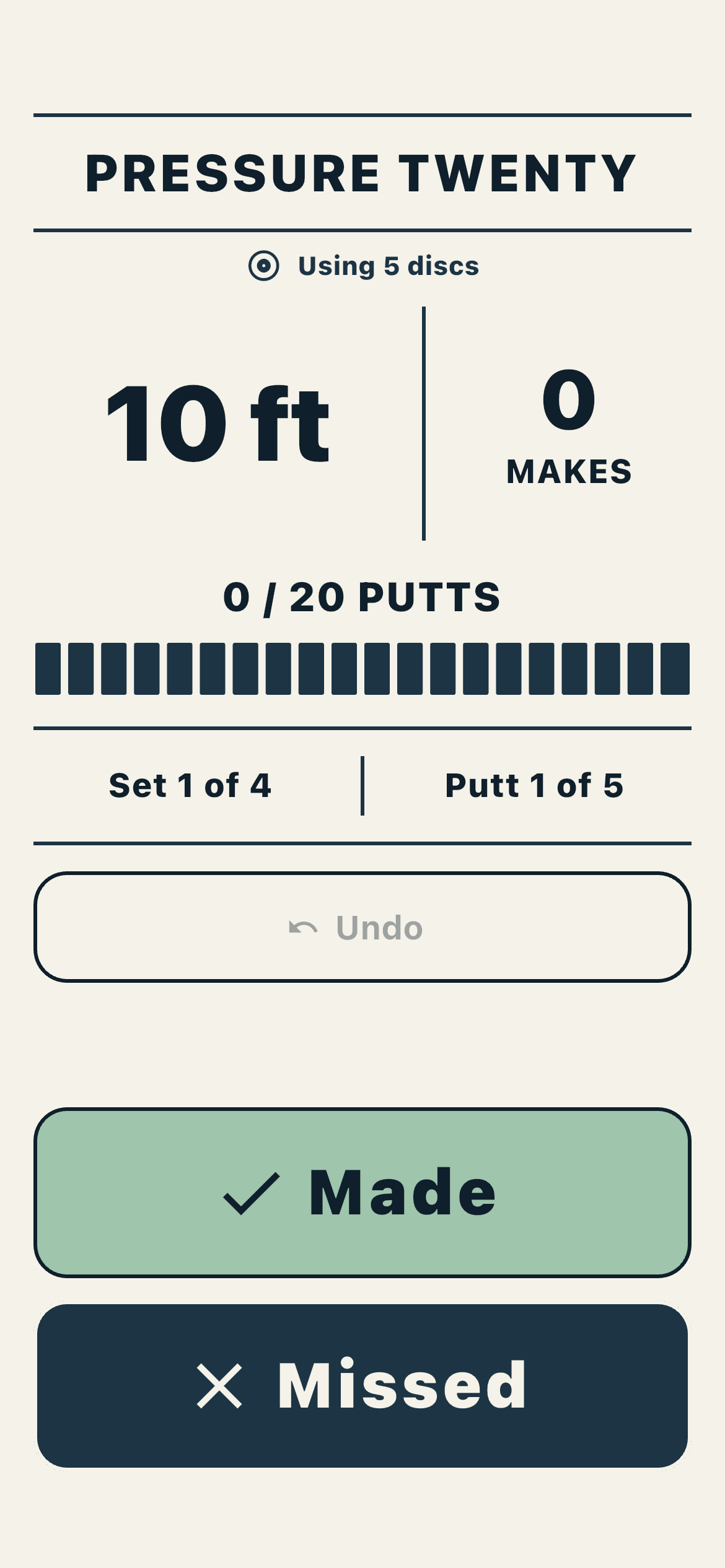
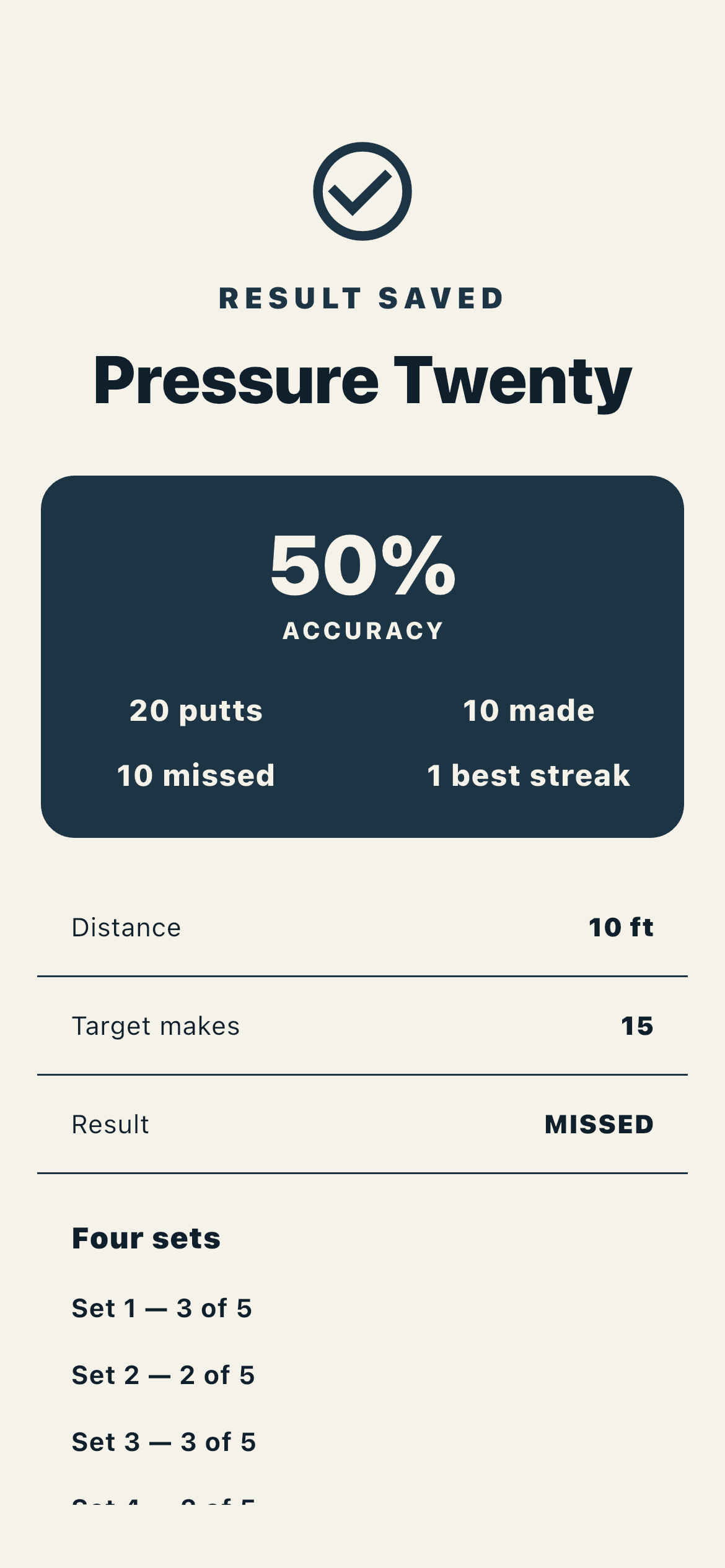
See the scoring and saved-result screens from the same journey
Historical scoring · July 19, 2026
Historical saved result · July 19, 2026
The code separates the screen, the practice rules and the saved data. Flutter draws the interface; Riverpod keeps what the screen shows in step with the app; Drift manages the local database. That separation lets us improve a screen without also rewriting how practice is scored or stored.
Text version
Simplified PuttPulse architecture: interface and Riverpod state use application services, domain rules and repositories, and local Drift storage; optional connected and commercial adapters remain separate.
The useful lesson for me was to specify the promises before asking AI to build the screen. “Undo the last putt” sounds small, but it affects the score, the saved record and the next chart. Giving the agents that whole example made the work easier to review than a request to make the app more reliable.
The app started feeling useful to me when I was practising consistently, had added reminders, and integrated them with my Google Calendar. It had become part of my routine. That was encouraging, but regular use and a trustworthy record still leave the question of how much my game improves.
5. Make performance understandable
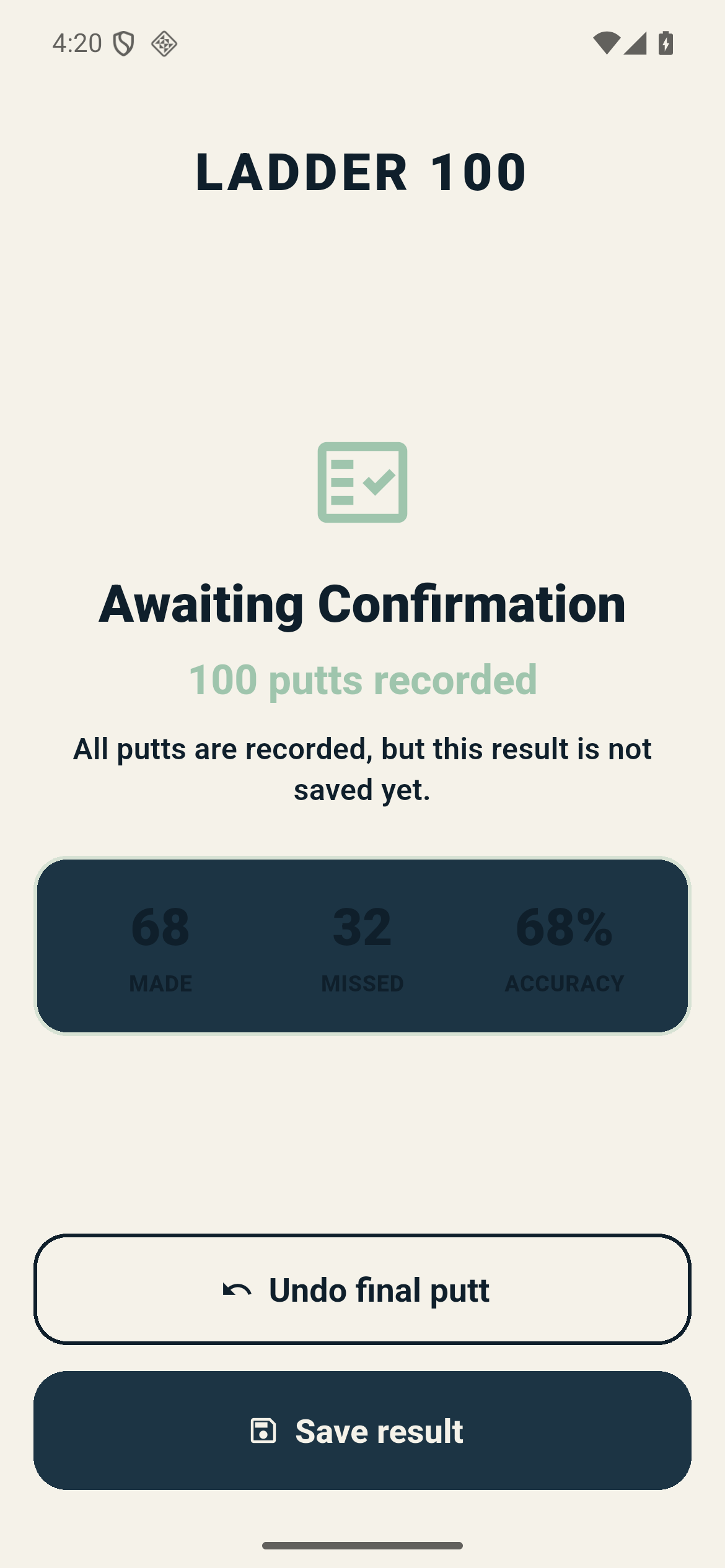
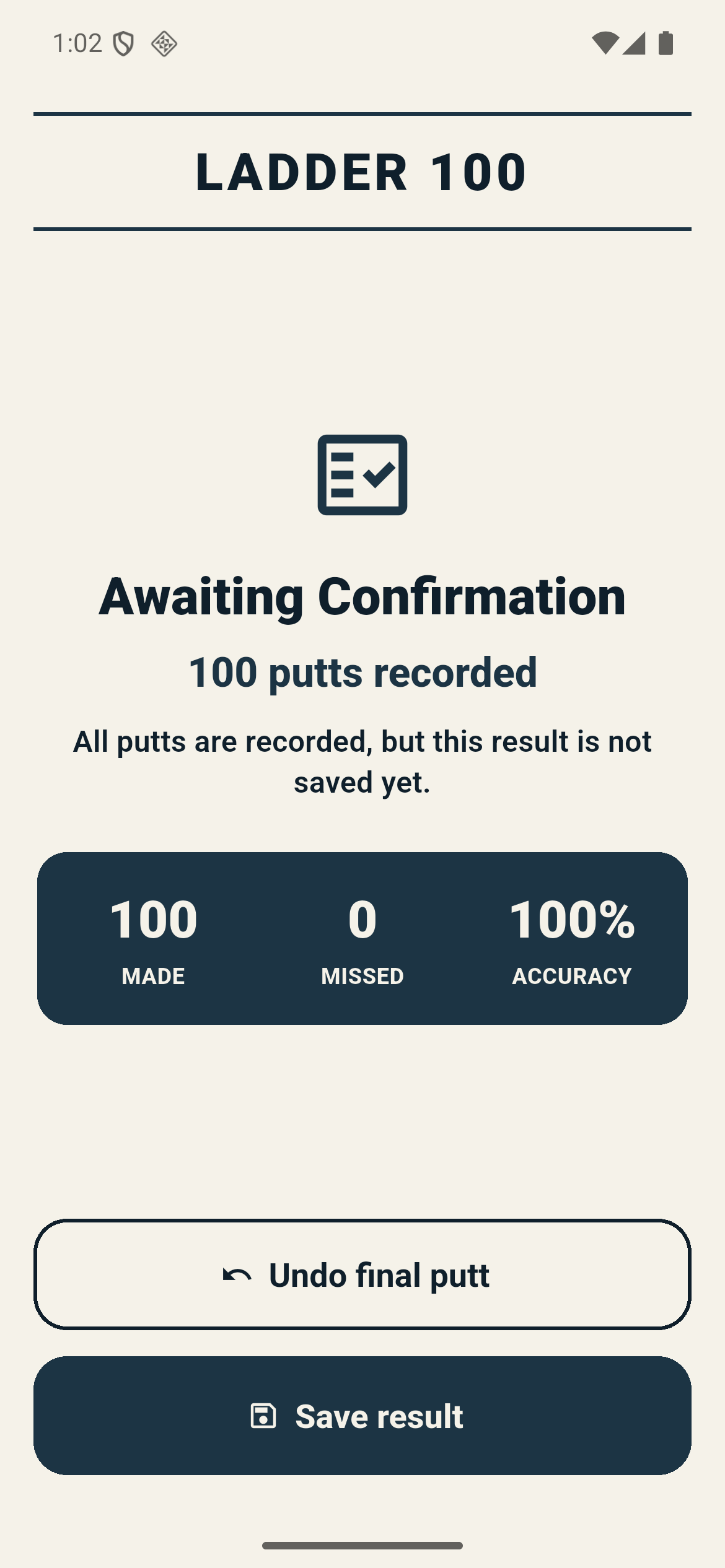
Following a session from scoring through Undo and Save exposed a different problem: essential text was difficult to read, and layouts broke at large text sizes. The practice flow worked, but using it comfortably still needed attention.
A working screen still needs readable text
Before
Historical app · July 16, 2026
Open full screenshot ↗
After
Historical app · July 17, 2026
Open full screenshot ↗
The result was there, but it was hard to read. Stronger contrast makes the numbers and labels easier to pick out at a glance.
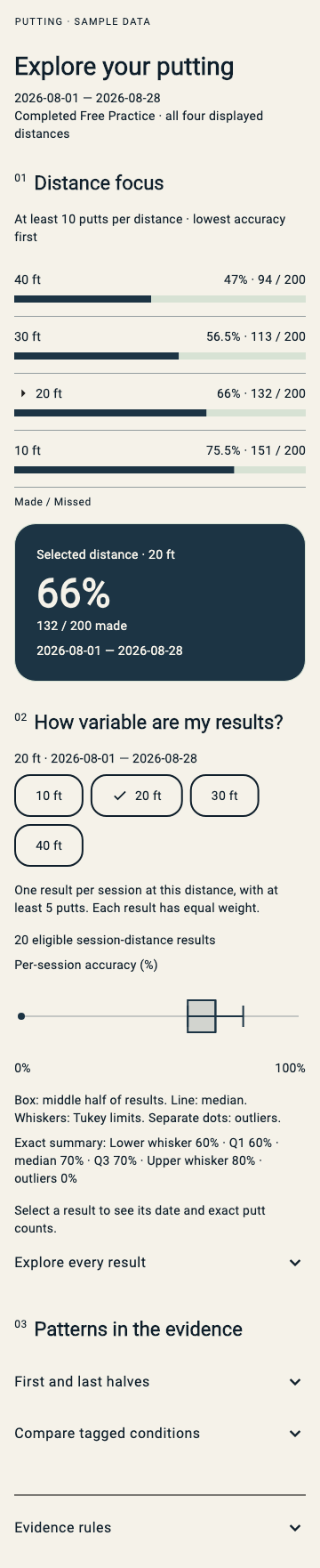
With my data background, the analytics were a natural place to spend time. Getting a percentage onto the screen is the easy part. Which attempts belong in it? Are the results comparable? Is there enough practice history to say anything useful? A polished chart still needs answers to those questions.
From a statistical box to visible observations
Before
Prototype · synthetic data · October 26, 2026
Open full screenshot ↗
After
Prototype · synthetic data · October 26, 2026

Open full screenshot ↗
A summary can hide the pattern. Showing each session makes it easier to see whether results cluster together or vary widely. This prototype uses example data.
6. Shorten the feedback loop
Waiting for tests and emulators was frustrating. With agents helping implement changes, the time spent waiting for feedback became more noticeable. Linear’s account of reworking its CI bottleneck got me looking at our own loop. Their pipeline was different from our local Android tests, but avoiding repeated setup was something we could investigate.
I asked the agents to reduce waiting without removing tests. On the same Android emulator, one build and installation replaced six setup cycles, eliminating five repeats. The figure shows the median time in these measured repeat runs; all retained the same test outcomes.
Build once.
Run the same tests.
Before Six separate test groups
- Build → Install → Test group 1
- Build → Install → Test group 2
- Build → Install → Test group 3
- Build → Install → Test group 4
- Build → Install → Test group 5
- Build → Install → Test group 6
After One combined test run
Build once → Install once
- Test group 1
- Test group 2
- Test group 3
- Test group 4
- Test group 5
- Test group 6
The same six groups run together.
20.07 min → 12.02 minAbout 8 minutes saved per suite
October 7 measurements · Median of two repeat runs per runner · 28 passed, four skipped.
What does a “warm” run mean?
A repeat run could reuse files from an earlier build and previously downloaded dependencies. Each full run still started with a fresh app installation. The first run removed the build files but kept those downloaded dependencies.
Inspiration: Linear’s CI bottleneck article. Timings: PuttPulse’s own recorded Android benchmark.
Inspect the measured runs and comparison chart
Text version
Warm validation comparison on a zero-based minutes axis: existing runner 20.07 minutes, build-once runner 12.02 minutes; two observations per runner, with the same 28 passes and four skips.
| Recorded invocation | Existing runner, seconds | Build-once runner, seconds |
|---|---|---|
| Cold-worktree | 1,395.489 | 777.457 |
| Warm 1 | 1,275.627 | 741.187 |
| Warm 2 | 1,132.307 | 700.993 |
| Warm median | 1,203.967 | 721.090 |
A separate review still found a problem the speed measurements had missed: timeout monitoring could stop while parts of the test process were still running. A timed-out attempt could therefore leave work behind. The fix kept the time limit active until the work and its reporting had both finished, and stopped the whole group of test processes when time ran out. New tests reproduced the failure before the correction. A faster successful run had not proved that the tools handled failure safely.
The measured speedup belongs to that prototype; later safeguards were not timed again. Nor did the shorter reports establish any saving in AI tokens or dollars. I still want concise reports of decisions and blockers, with the detailed evidence available when I need it. I’ve considered, but haven’t implemented, the i-have-adhd skill. The “dark factory” is an ambition for now.
Prompt case 3 — reduce waiting without dropping tests
Reconstructed task brief, based on the benchmark; not a recovered transcript:
Compare the current Android test process with one that builds and installs the app once for all test groups. Keep the same app behavior, tests and expected results. Record the exact versions and every run, check that tests leave a clean starting point for one another, and report timings, passes, skips and limitations.
Context, verification and human review
This brief is reconstructed from the recorded experiment. The numerical record above keeps the successful timings separate from the later review and repairs.
7. Take the product beyond my computer
Getting PuttPulse onto my computer was one part of the project. Getting it into someone else’s practice routine brought a different set of questions: who could use it, how I could sustain it, and which decisions needed people with experience I didn’t have.
Language was another place where AI widened what I could attempt. With its help, I generated translations and built language support for 11 languages: English, French, Spanish, German, Czech, Estonian, Finnish, Swedish, Norwegian Bokmål, Danish and Icelandic. That meant translating interface labels, drill instructions and feedback, not just putting a language menu in Settings.
English and French mattered for Canada, and Spanish for reaching more players in the United States and elsewhere. I also wanted to prioritize the Nordic countries, where disc golf has a strong following. UDisc’s analysis of rounds recorded in 2024 puts Norway, Finland, Sweden and Iceland at the top of its per-capita ranking. Supporting those communities made more sense to me than treating English as the default audience for everything.
The free/Premium split was a way to balance access with sustaining the app. Free Practice and the three core drills give players a useful routine, unlimited scoring, local history and basic analytics. Premium adds the five other games, practice recommendations, longer-term trends and more ways to examine the data. The intended subscription also removes ads. These are the designed access tiers; paid billing and advertising still need release work.
| Intended access | Player value | Revenue model |
|---|---|---|
| Free | Four drills, unlimited scoring, local history and basic analytics | Intended to be advertising-supported |
| Subscription | All nine drills, recommendations and deeper analytics | Intended paid access without ads |
I wanted the free version to be useful by itself. The reason to pay would be more variety and help interpreting a growing practice history, while supporting continued development. The paywall should not make recording an ordinary session feel like a trial that is about to run out.
I also ran into costs I wish I’d known about earlier. After I asked what Duolingo used, agents suggested exploring Rive for animation. I put work into it before finding out that the route I wanted involved payment. Figma led to similar frustration. I should have set clearer agent instructions at the start: check pricing and export limits before recommending a tool or investing work in it. My preference for free tools needed to be an explicit project constraint.
Developer enrollment affected the budget too. I remember weighing Android’s one-time fee against Apple’s recurring annual membership, and cost was one reason I deferred iPhone distribution. These were project expenses to plan for alongside the engineering.
Artwork had its own production process: generated source masters, optimized assets for the app, and drill poses for me to review. Having a motion concept or an editable source didn’t automatically give us an approved asset we could use in the app.
An identity, and a little personality
Historical brand assets · August 2026

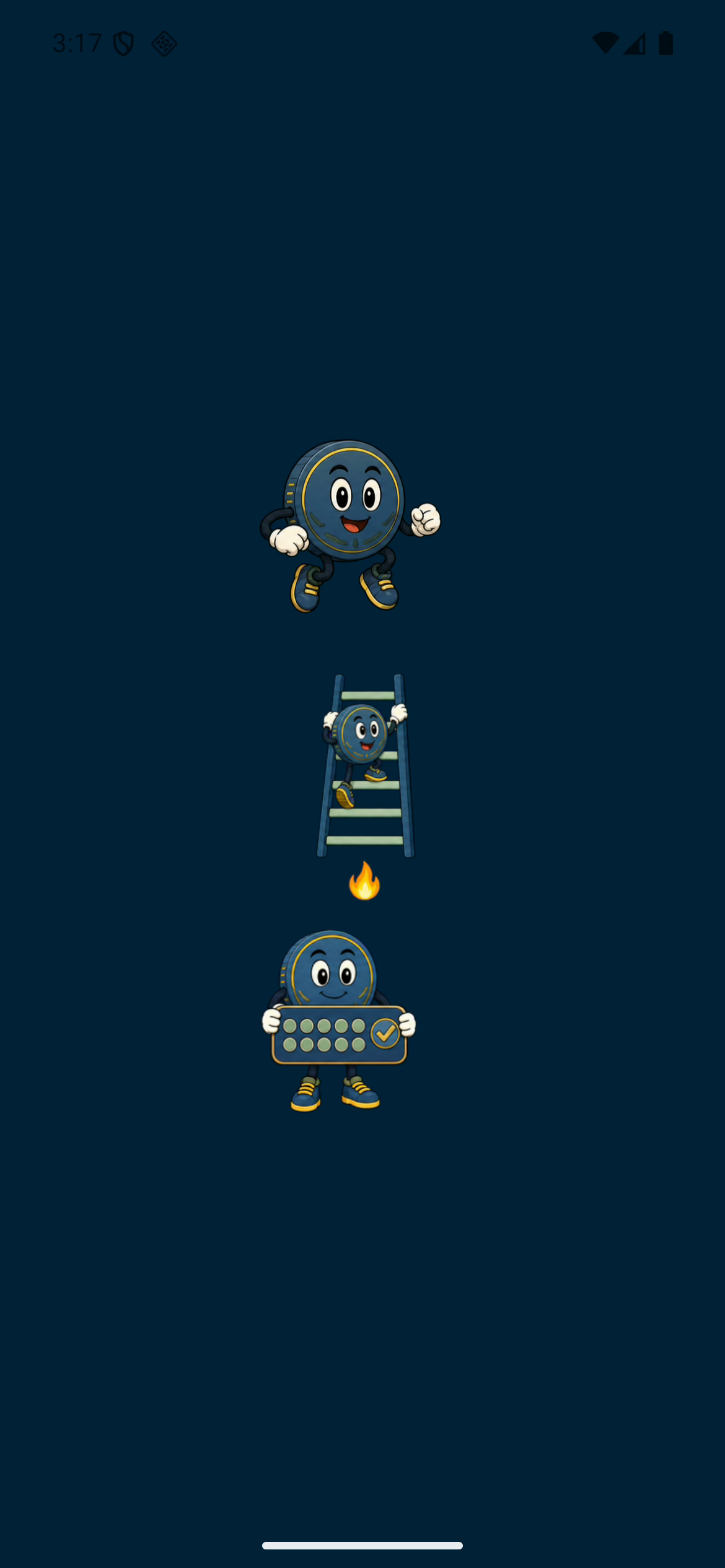
Emulator recording · July 24, 2026
Watch Pip move
Pip gives the app a little personality between putts. Play this short clip to see three early animation styles.
Recorded during development in July 2026.
View the still frameFrom the app icon to Pip’s movements, the artwork helped practice feel like part of the same product.
Generating those translations with AI was an accomplishment I could build on, not the end of localization. Automated checks can find missing text, and large-text checks can expose layout problems. Fluent speakers still need to tell me whether a drill instruction sounds natural and uses the right disc-golf terminology. That review remains open for the non-English languages.
Training advice needs more than working code. I still need a qualified coach to review the recommendations and players to try them over time. The agents helped prepare the review and feedback materials; getting useful human feedback is the next step.
Ads also brought decisions beyond screen design: age-appropriate settings, privacy, and when an ad can interrupt practice. A review caught background work that could continue after a timeout, prompting a fix. Advertising stayed disabled while we worked through those requirements.
Longer term, I’d like to work with professional players, coaches and complementary apps. One idea is to give coaches free access for the players they coach, so they can use practice records alongside their own advice. In return, I’d get feedback to improve PuttPulse and introductions to people who might find it useful. Working with other apps could connect putting practice to the wider routines players already use. These are partnerships I want to develop: useful tools for their players, better feedback and visibility for PuttPulse, and a chance to learn whether the practice translates into a better game.
8. Get it into players’ hands
One Android build worked during development but failed when packaged for distribution. The lesson was simple: test the version a player will actually install. We fixed the startup problem and added checks for that packaged build.
Getting into a closed test also meant developer accounts, signing, store forms, privacy information, screenshots, and finding testers. Agents could prepare much of that work, leaving me to review the decisions and make the commitments.
Earlier builds reached selected Android testers. The newer candidate still needed a failing animation test resolved, checks on a real phone, and feedback from players. A successful build was a milestone; useful practice in someone else’s hands was the goal.
9. What I would carry into the next project
AI agents helped me take a practice idea into a framework I hadn’t used before. For another project, I’d use the same small loop, with clearer cost constraints from the outset:
- Define the player’s problem and the limits. The analytics brief started with seeing individual sessions; the Figma and Rive experience taught me to ask about costs before investing effort.
- Agree on one change and what would count as success. For the test runner, that meant less waiting with the same tests and outcomes.
- Let the agent implement it and return evidence: what changed, what was checked, and what is still unresolved. Keep the detailed records available without making every report a wall of text.
- Examine the result, using a focused second opinion where it matters. The timeout defect showed why a good benchmark alone was not enough.
- Choose the next step. Some work can continue; a coaching decision needs a coach, and a distribution build needs to be tried as a player would install it.
A version that works during development is not yet the version someone can download and rely on. Packaging, installation and real use each need attention. I can delegate preparation and checks, but the product choices and commitments remain mine.
PuttPulse has a working offline practice flow and a history of closed-test delivery, with analytics, coaching validation and release work still to finish. I started by asking what to practise next. The more important test is whether choosing better drills, distances and a sustainable practice rhythm helps me—and eventually other players—putt better on the course.